

Author Archives: jin

How to Choose the Right WordPress Agency for Your Business

Choosing a WordPress agency is less about finding the most impressive portfolio and more about finding a partner who can turn a business goal into a reliable, maintainable website. The right questions help you compare proposals fairly and avoid unclear ownership, unexpected costs and a site that looks polished but does little for customers.

Start with the outcome, not a feature list

Before speaking to an agency, write down the main job the website must do. That may be generating qualified enquiries, supporting local search, selling products, explaining a complex service or reducing repetitive admin. Add the audiences you need to serve and the action each visitor should take.

A useful brief does not need technical language. It should explain the current problem, what success would look like, essential integrations, any fixed deadlines and who will approve the work. See WebXpert’s web solutions approach for the decisions typically covered.

Review evidence carefully

Do not judge an agency only by screenshots. Ask what problem each project addressed, what the agency actually delivered and what happened after launch. Check a live site on mobile, follow its navigation and try its forms. Look for clear messaging, accessible controls, fast loading and a sensible customer journey.

Where a portfolio includes concept work, it should be labelled clearly. Where outcomes cannot be independently verified, treat them as context rather than proof. WebXpert’s case studies distinguish live examples from concept studies.

Ask how the project will run

A credible proposal should explain discovery, sitemap and content planning, design review, development, testing, launch and support. Ask who your day-to-day contact will be, how decisions are recorded and how many review rounds are included.

  • Who is responsible for copy, images and approvals?
  • Will you see page structure before visual design begins?
  • How will mobile, browser, form and accessibility checks be handled?
  • What happens when feedback changes the agreed scope?
  • What training or handover is provided?

Confirm ownership and access

Your contract should state who owns the design, written content, domain, hosting account and paid licences. You should know which accounts will be created, whose email address controls them and what access you receive at launch.

Ask whether the site uses a custom theme, a commercial theme or a page builder, and what that choice means for future editing. There is no single correct setup, but the trade-off should be explained in plain English. Avoid arrangements that make normal access or migration unnecessarily difficult.

Discuss maintenance before launch

WordPress core, themes and plugins change over time. Clarify who will manage backups, updates, security monitoring, uptime, software licences and recovery. Ask whether updates are tested, whether a staging environment is available and how urgent issues are handled.

The official WordPress update guidance recommends keeping WordPress current and backing up before an update. A maintenance proposal should turn that principle into a clear routine with named responsibilities.

Compare quotations on the same basis

A low headline figure may exclude content, licences, search setup, tracking, accessibility work or post-launch support. Compare the deliverables, assumptions and exclusions—not only the total. A useful quotation should show:

  • pages or templates included;
  • content and migration responsibilities;
  • forms, ecommerce or integrations;
  • testing and launch tasks;
  • hosting, licence and maintenance costs;
  • payment stages and change-control terms.

Watch for practical warning signs

Be cautious when an agency promises guaranteed rankings, cannot explain its process, avoids questions about ownership, relies on vague technical language or pressures you to decide before the scope is clear. Also question proposals that recommend many plugins without explaining why each is needed.

A 12-question agency checklist

  1. What business outcome will the website support?
  2. Which audiences and journeys are in scope?
  3. Who will do the work and manage communication?
  4. What exactly is included and excluded?
  5. How will content be planned and approved?
  6. How will mobile usability and accessibility be checked?
  7. How will performance, forms and analytics be tested?
  8. Who owns the site, accounts and licences?
  9. What access will I receive?
  10. What maintenance is required after launch?
  11. How are scope changes priced and approved?
  12. What does a successful launch look like?

Choose clarity over salesmanship

The best agency for your business is the one that understands the commercial problem, explains its decisions, documents the scope and leaves you with a website you can operate confidently. If you want to compare an idea against a clear scope, request a WebXpert quotation. A short, plain-language brief is enough to begin.

Editorial note: This guide reflects WebXpert’s practical approach to scoping small-business websites. Platform features and third-party services change, so current supplier documentation should be checked before a final decision.

What a Startup Website Needs to Earn Trust and Generate Enquiries

A startup website does not need to be large. It needs to make the business easy to understand, credible enough to trust and simple to contact. That means prioritising a clear message and a reliable customer journey before adding ambitious features.

Give the website one primary job

Decide what the next useful action is: request a consultation, join a waiting list, book a demonstration, buy a product or contact the founder. Build the page hierarchy around that action. Multiple competing calls to action make an early-stage business feel less certain.

Explain the offer in the customer’s language

Your opening section should answer three questions quickly: what do you provide, who is it for and why should the visitor continue? Replace broad claims such as “innovative solutions” with the specific problem you solve and the result a customer is seeking.

Support the main message with concise service or product explanations, likely use cases and a transparent next step. WebXpert’s web solutions service starts with this customer journey rather than a template feature list.

Build trust without inventing proof

Early-stage businesses may not have years of case studies. Use evidence you genuinely have: founder experience, product demonstrations, a clear process, named partners with permission, security or compliance information, customer feedback that can be substantiated, and honest concept examples.

Do not publish fabricated statistics, testimonials or client logos. If work is a prototype or concept, label it. See how WebXpert separates live examples and concept work in its case studies.

Include the pages buyers need

  • Home: the offer, audience, proof and primary action.
  • Product or service: what is included, who it suits and how delivery works.
  • About: why the business exists and who is accountable.
  • Contact or quotation: a short, labelled form with an alternative contact route.
  • Privacy: how personal information is collected and used.

Add pricing only when it helps the buying decision and accurately reflects the offer. Otherwise explain the factors that shape a quotation and what information you need from the customer.

Make mobile, speed and accessibility part of launch

Test the main journey on a real phone. Check headings, text size, colour contrast, keyboard navigation, image alternative text, form labels, validation messages and tap targets. Compress oversized images and avoid loading features that do not help the visitor.

Accessibility and performance are not finishing touches. They affect whether people can understand the offer and complete the primary action.

Set up measurement you will actually use

Track a small number of meaningful events, such as qualified form submissions, calls, bookings or completed purchases. Record the traffic source where appropriate and review whether visitors reach the pages that support a decision. Avoid collecting data without a clear purpose.

Keep ownership and maintenance clear

The startup should control its domain, hosting, analytics and important software accounts. Document who can access them. Establish backups, updates, security checks and a process for changing contact details, offers and legal information.

When WordPress is a good fit

WordPress can work well when the team needs flexible content, landing pages, publishing or ecommerce and wants access to a wide supplier market. It may be less suitable when the core product requires highly specialised application logic; in that case, a separate product platform and marketing site may be clearer.

A focused launch checklist

  1. Can a new visitor explain the offer after reading the opening section?
  2. Is there one obvious primary action?
  3. Are all claims and examples accurate and properly labelled?
  4. Do forms work and explain what happens next?
  5. Has the site been checked on mobile and with a keyboard?
  6. Are analytics, privacy and cookie choices appropriate?
  7. Does the business control every critical account?
  8. Is there a documented maintenance routine?

Launch a useful first version

A focused site with accurate content and a working enquiry path is more valuable than a large site filled with generic copy. Launch the smallest version that answers real buying questions, then improve it using customer conversations and measured behaviour. To scope a practical first version, get a WebXpert quotation.

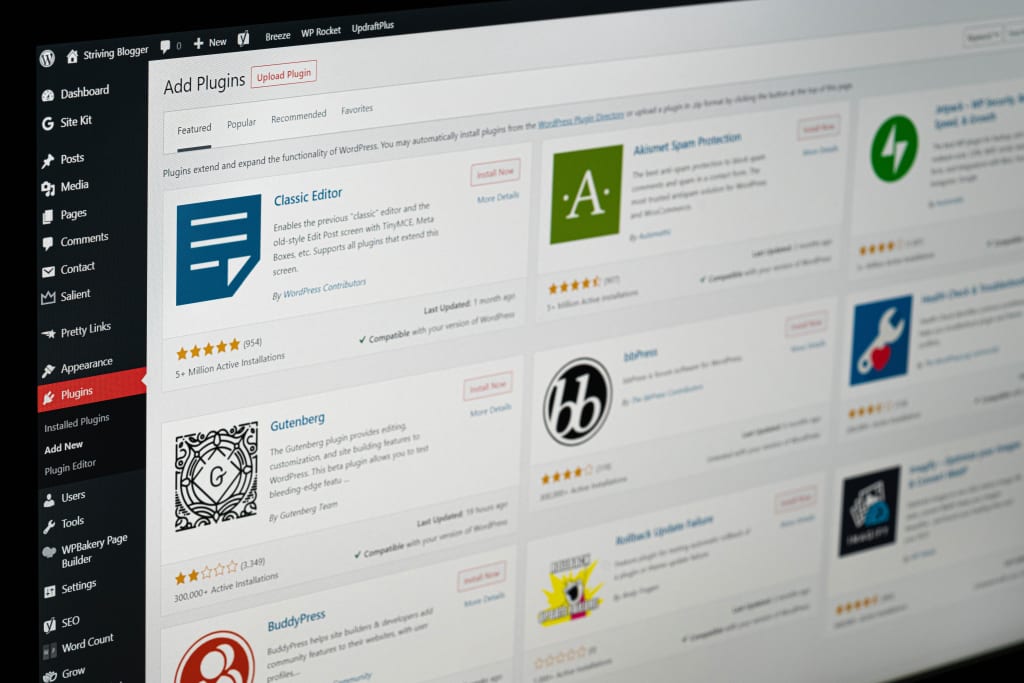
How to Choose WordPress Plugins for a Business Website

A business website does not need a fixed list of “must-have” WordPress plugins. It needs the smallest reliable set that supports real requirements. Every additional plugin introduces another supplier, update cycle and possible point of conflict, so selection should begin with the job—not the product name.

Start with requirements and existing capability

List what the website must do, then check whether WordPress, the theme, the host or an existing plugin already provides it. Avoid installing two tools for the same purpose. Overlapping SEO, caching, security or page-building plugins can create confusing settings and unpredictable behaviour.

Use a consistent selection test

Before installing a plugin, review:

  • Purpose: does it solve a documented need?
  • Maintenance: is it actively supported and compatible with your WordPress version?
  • Reputation: are support history, reviews and documentation credible?
  • Data: what information does it collect, store or send elsewhere?
  • Performance: what scripts, database activity or external services does it add?
  • Access: which user permissions does it require?
  • Exit: what happens to the content or data if the plugin is removed?
  • Cost: which licences, renewals and usage limits apply?

The official WordPress plugin directory shows compatibility, update and support information for listed plugins. Treat those signals as part of due diligence, not a guarantee.

Common capability categories

Forms and enquiries

Choose a form tool that supports accessible labels, clear validation, spam protection, appropriate notifications and secure data handling. Test the complete journey, including confirmation messages and delivery to the correct inbox.

Search optimisation

An SEO plugin can help manage titles, descriptions, canonical URLs, sitemaps and structured data. It cannot replace a useful page, accurate claims or a clear site structure. Use one primary SEO tool and configure it deliberately.

Performance and caching

Your hosting service may already provide page caching or optimisation. Confirm that before adding another caching plugin. Test changes on mobile and check important forms, ecommerce and logged-in functions after enabling optimisation.

Security and access

Security depends on more than a single plugin. Use strong account controls, least-privilege access, maintained software, secure hosting and reliable backups. A security plugin may add monitoring or protection, but it should fit the wider plan and be configured correctly.

Backups and recovery

A backup is useful only if it is recent, stored safely and can be restored. Decide what is backed up, how often, where copies are stored and who tests recovery. Take a fresh backup before higher-risk updates.

Analytics and consent

Install measurement tools only when the business will use the information. Understand which cookies or identifiers are set, minimise unnecessary collection and make sure privacy and consent information matches the actual configuration.

Ecommerce and specialist functions

Add ecommerce, booking, membership or multilingual tools only when the requirement exists. These systems affect payments, customer data, emails and operational processes, so support and testing requirements are higher.

A safe update routine

  1. Confirm that a current backup exists.
  2. Read the release notes and compatibility information.
  3. Use a staging site for higher-risk or business-critical changes.
  4. Update one logical group at a time.
  5. Test navigation, forms, checkout, emails and key integrations.
  6. Record the change and keep a recovery path.

WordPress publishes official guidance on updates and backups. Your routine should also reflect the importance of the site and the support available from your host or developer.

Warning signs

Pause before using a plugin that has unclear ownership, long periods without maintenance, unresolved compatibility warnings, poor documentation, excessive permissions or no practical way to export important data. Also question any recommendation based only on popularity.

The smallest useful stack wins

A well-maintained website with five carefully selected plugins can be safer and easier to operate than one with dozens of overlapping tools. Document why each plugin exists, who pays for it, who maintains it and how the site behaves without it.

If you need help reviewing an existing setup or planning a maintainable build, explore WebXpert’s web solutions or request a quotation.

Editorial note: Plugin features, ownership and compatibility change. Check current WordPress and supplier documentation before installing or updating software on a live website.